
For my first blog post, I will dive into an essential subject of the Kerberos protocol: The delegation of privileges.
The delegation can take multiple form: Unconstrained, constrained, and resource-based constrained delegation.
Unconstrained Delegation
Unconstrained Delegation was the first type of delegation of privilege available in Windows 2000, it has since been kept for backwards compatibility & interoperability reasons.
I will quote a wonderful explanation of the unconstrained delegation made by Sean Metcalf in his post describing in details the protocol:
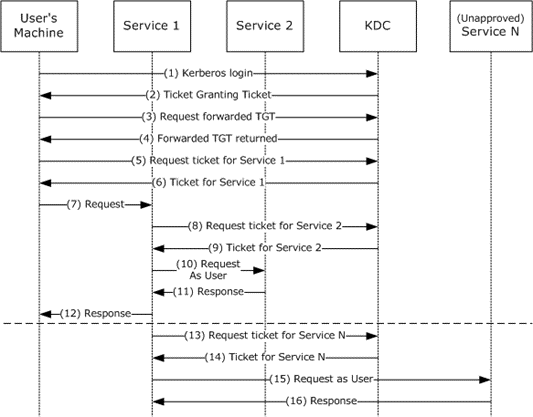
When Kerberos Unconstrained Delegation is enabled on the server hosting the service specified in the Service Principal Name referenced in the TGS-REQ (step 3), the Domain Controller the DC places a copy of the user’s TGT into the service ticket. When the user’s service ticket (TGS) is provided to the server for service access, the server opens the TGS and places the user’s TGT into LSASS for later use. The Application Server can now impersonate that user without limitation!
Abuse Unconstrained Delegation
As attackers, abusing unconstrained delegation would allow us to impersonate any users interacting with the service.
This could be done using social-engineering in order to trick domain users to connect to any service on the machine.
[!Caution] A domain user with the AccountNotDelegated set to true is protected against impersonating via delegation (
Get-ADUser -Filter {AccountNotDelegated -eq $true}).
Enumerate Unconstrained Delegation
As attackers, we can enumerate machines with unconstrained delegation set by looking at machine with the userAccountControl attribute containing ADS_UF_TRUSTED_FOR_DELEGATION.
We can either:
- Use the LDAP filter
(userAccountControl:1.2.840.113556.1.4.803:=524288) - Use PowerView’s
Get-DomainComputer -Unconstrained
Constrained Delegation
As we saw, unconstrained delegation isn’t the pinnacle of secure practices. That’s why Microsoft decided to come with a new type of delegation for Windows 2003: The “constrained” delegation.
In broad terms, the idea is to no more
This type of delegation comes handy with a new set of Kerberos protocol extensions:
- S4U2Self
- S4U2Proxy
We will see later on how these two protocol extensions permits the protocol transition from a non-Kerberos authentication, to a Kerberos one.
S4U2Self
S4U2Self stands for Service for user to Self. In better explanation, S4U2Self allows a service to request to the KDC a forwardable service ticket to itself, on behalf of a user.
This comes in handy for user authenticating to a service using a non-Kerberos authentication method.
Typically, a user authenticating on a file manager web server using a form-based authentication would get his credentials verified against the AD, then the service account would be able to identify the user and ask a TGS to the KDC on behalf of him (S4U2Self) so that he can access the service. In this scenario, the user never had to directly communicate with the KDC, instead, constrained delegation, and more precisely S4U2Self, made the protocol transition (from a non-Kerberos authentication protocol to Kerberos) possible.
In unconstrained delegation, the TGT was used to identify the user, in constrained delegation, the S4U protocol extension is identified using the user name and user realm, via the padata type PA-FOR-USER:
    PA-FOR-USER ::= SEQUENCE {
       -- PA TYPE 129
       userName              [0] PrincipalName,
       userRealm             [1] Realm, //
       cksum                 [2] Checksum,
       auth-package          [3] KerberosString
    }
Requirements for S4U2Self
- Same as for unconstrained delegation, a user with the AccountNotDelegated flag set to true cannot be impersonated via S4U2Self
- The service account/machine must have the TRUSTED_TO_AUTH_FOR_DELEGATION field set in UAC
S4U2Proxy
S4U2Proxy allows the service account/machine to use a forwardable service ticket to request a service ticket to any SPN specified in the msDS-AllowedToDelegateTo field of the requesting user (service account/machine).
This way the delegation is constrained to the specific service defined in the msDS-AllowedToDelegateTo attribute.
In order to configure & modify the msDS-AllowedToDelegateTo attribute, the SeEnableDelegation privilege is needed. It is typically only granted to Domain Admins.
Resource-based Constrained Delegation
After constrained delegation and unconstrained delegation, Microsoft decided to come with a new type of constrained delegation: Resource-based Constrained Delegation, introduced in Windows Server 2012.
Microsoft decided to shift the control of constrained delegation from privileged accounts, such as Domain Admins, to the resources themselves, enhancing interoperability by allowing resources to specify which accounts are trusted to delegate on their behalf.
RBCD (Resource-based Constrained Delegation) is similar to constrain delegation, but works in the opposite direction:
In classic constrained delegation, the delegation from account A to account B is configured on account A via the msDS-AllowedToDelegateTo attribute, wheras in resource-based constrained delegation, the delegation from account A to account B is defined on account B, in the msDS-AllowedToActOnBehalfOfOtherIdentity attribute.
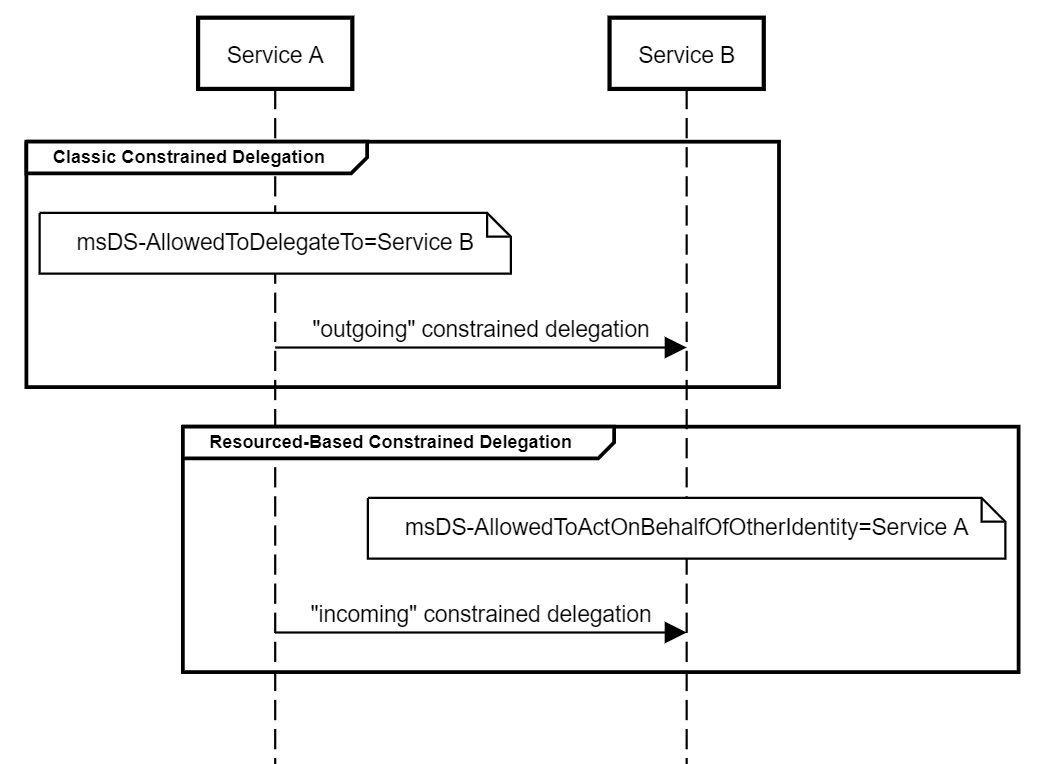
Another feature of RBCD (and thus, difference with classical constrained delegation) is that the resource can modify its own msDS-AllowedToActOnBehalfOfOtherIdentity attribute, making the delegation of privileges much more effective than in classic constrained delegation.
However this new feature comes with its set of design flaws..
Abusing Resource-based Constrained Delegation
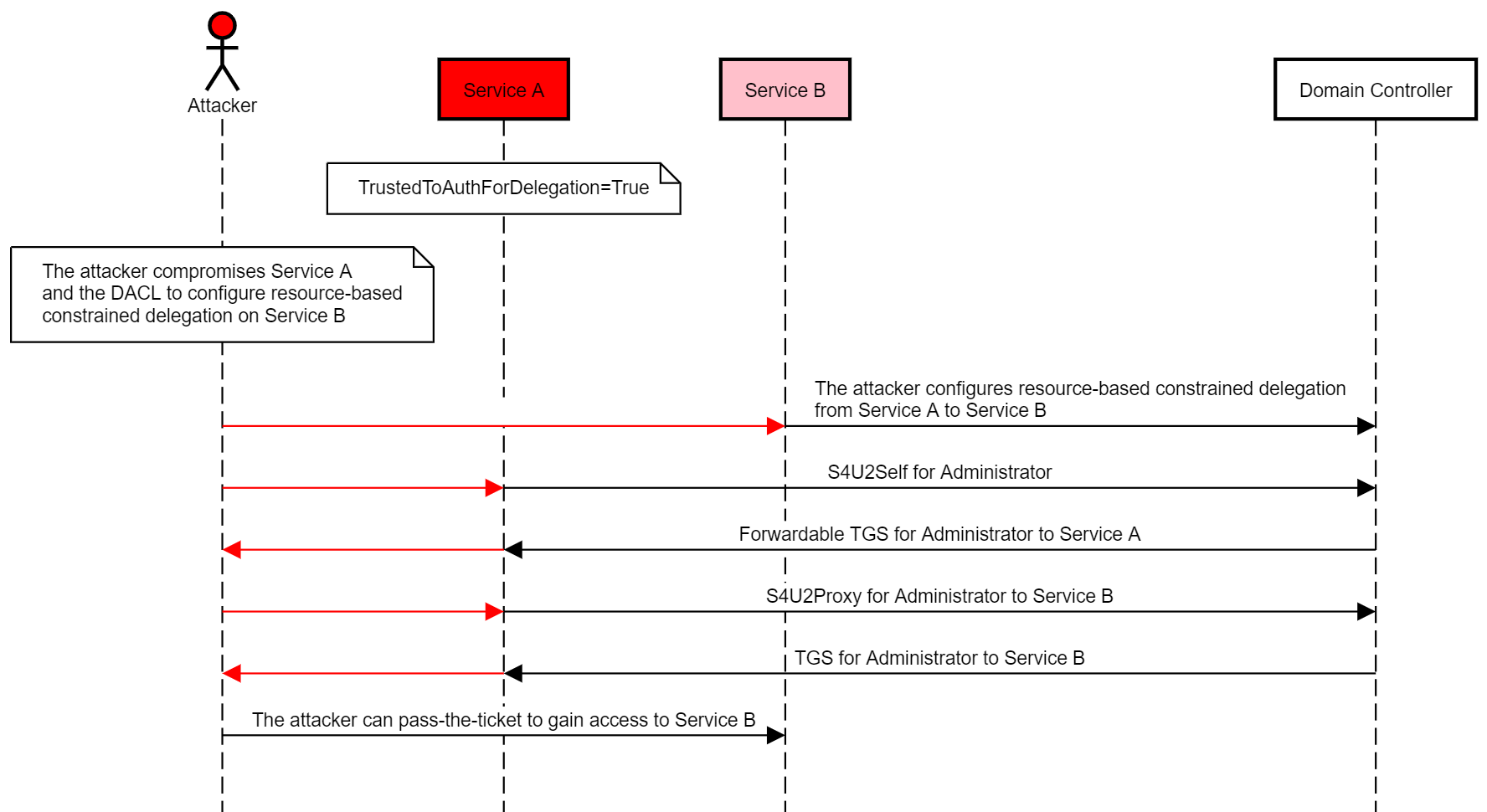
Selfless abuse
Mitigations
Coming..